やったこと
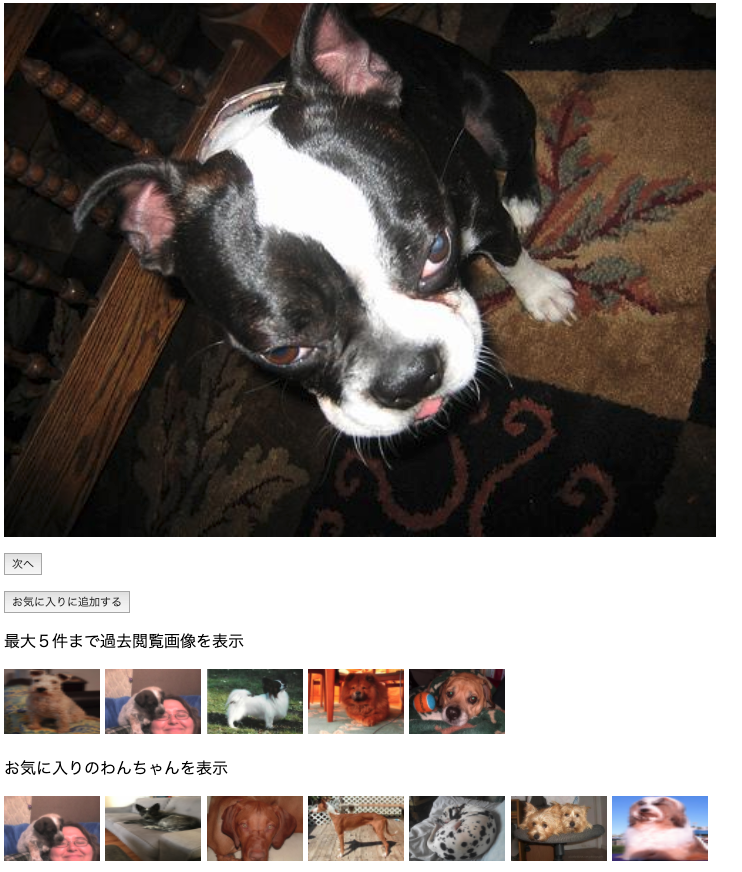
ユーザの閲覧履歴やお気に入り履歴をlocal Strageに溜め込んでブラウザ側だけで履歴情報を表示するページを作りました。
中の処理ではVue.jsを使っています。
使っているもの / できること
- 犬の画像をランダムで取得するAPI
- 直近5枚の見た画像の履歴を表示
- お気に入りへの追加、およびその削除
動いているページ
http://shima-07.ml/
ソースコード
<html><head><title>Hello My WebSite!</title><style>img.pic1{width:50%;height:auto;}</style><style>img.pic2{width:96px;height:65px;}</style></head><body><divid= "app"><av-bind:href="src"target="_blank"><imgv-bind:src="src"class="pic1"/></a><p><buttonv-on:click="getData()">次へ</button></p><p><buttonv-if="good"v-on:click="delfavo()">お気に入りから削除する</button><buttonv-elsev-on:click="favo()">お気に入りに追加する</button></p><p>最大5件まで過去閲覧画像を表示</p><!-- 画像URLが存在するときのみ表示する--><av-bind:href="his_1"target="_blank"><imgv-if="his_1"v-bind:src="his_1"class="pic2"/></a><av-bind:href="his_2"target="_blank"><imgv-if="his_2"v-bind:src="his_2"class="pic2"/></a><av-bind:href="his_3"target="_blank"><imgv-if="his_3"v-bind:src="his_3"class="pic2"/></a><av-bind:href="his_4"target="_blank"><imgv-if="his_4"v-bind:src="his_4"class="pic2"/></a><av-bind:href="his_5"target="_blank"><imgv-if="his_5"v-bind:src="his_5"class="pic2"/></a><p>お気に入りのわんちゃんを表示</p><!-- 画像URLが存在するときのみ表示する--><av-bind:href="fav_1"target="_blank"><imgv-if="fav_1"v-bind:src="fav_1"class="pic2"/></a><av-bind:href="fav_2"target="_blank"><imgv-if="fav_2"v-bind:src="fav_2"class="pic2"/></a><av-bind:href="fav_3"target="_blank"><imgv-if="fav_3"v-bind:src="fav_3"class="pic2"/></a><av-bind:href="fav_4"target="_blank"><imgv-if="fav_4"v-bind:src="fav_4"class="pic2"/></a><av-bind:href="fav_5"target="_blank"><imgv-if="fav_5"v-bind:src="fav_5"class="pic2"/></a><av-bind:href="fav_6"target="_blank"><imgv-if="fav_6"v-bind:src="fav_6"class="pic2"/></a><av-bind:href="fav_7"target="_blank"><imgv-if="fav_7"v-bind:src="fav_7"class="pic2"/></a><av-bind:href="fav_8"target="_blank"><imgv-if="fav_8"v-bind:src="fav_8"class="pic2"/></a><av-bind:href="fav_9"target="_blank"><imgv-if="fav_9"v-bind:src="fav_9"class="pic2"/></a><av-bind:href="fav_10"target="_blank"><imgv-if="fav_10"v-bind:src="fav_10"class="pic2"/></a></div><script src="https://cdn.jsdelivr.net/npm/vue/dist/vue.js"></script><script src="https://unpkg.com/axios/dist/axios.min.js"></script><script>varfavlist=[];varu0,u1,u2,u3,u4,u5,u6;varstrage=[];vars=localStorage.getItem('imgs');/// お気に入りようの配列///if(localStorage.getItem('fav')){// JSON.parse(data) の形で取り出す必要がある。// ocalStorage.getItem('imgs').lengthにすると文字の長さになってしまうからダメ。JSON.parse()するfor(leti=0;i<JSON.parse(localStorage.getItem('fav')).length-1;i++){favlist.push(JSON.parse(localStorage.getItem('fav'))[i]);}}/// 過去画像ようの配列////if(localStorage.getItem('imgs')){// JSON.parse(data) の形で取り出す必要がある。// ocalStorage.getItem('imgs').lengthにすると文字の長さになってしまうからダメ。JSON.parse()するfor(letk=0;k<JSON.parse(localStorage.getItem('imgs')).length-1;k++){strage.push(JSON.parse(localStorage.getItem('imgs'))[k]);}}////////// メイン処理 //////////constapp=newVue({el:'#app',data:{src:'',his_1:'',his_2:'',his_3:'',his_4:'',his_5:'',good:false,fav_1:'',fav_2:'',fav_3:'',fav_4:'',fav_5:'',fav_6:'',fav_7:'',fav_8:'',fav_9:'',fav_10:''},/// 過去の履歴を出すところmethods:{getData:asyncfunction(){constURL='https://dog.ceo/api/breeds/image/random';constresponse=awaitaxios.get(URL);this.message=response.data;this.src=response.data.message;// local strageにため込む処理strage.unshift({url:this.src});//先頭に追加// 5こ以上は消すstrage=strage.slice(0,6);localStorage.removeItem('imgs');//imgsだけ消すlocalStorage.setItem('imgs',JSON.stringify(strage));// JSON.stringify(data) の形が需要。console.log(strage);u0=this.src;// 過去見たものの表示をするif(localStorage.getItem('imgs')){// エラーを防ぐ為に、過去履歴が存在するときだけ、その分だけ表示するfor(letj=0;j<JSON.parse(localStorage.getItem('imgs')).length;j++){eval("this.his_"+j+"= JSON.parse(localStorage.getItem('imgs'))["+j+"].url");// 普通に this.his_j = JSON.parse(localStorage.getItem('imgs'))[j].url;とは書けない}}console.log(this.his_1);this.good=false;// 画像が変わったらボタンを変える},///お気に入り登録する機能favo:function(){this.url=u0;favlist.unshift({url:this.url});localStorage.setItem('fav',JSON.stringify(favlist));this.good=true;console.log(favlist);console.log(this.good);///表示するif(localStorage.getItem('fav')){// 存在確認とあまりにお気に入りが多い場合は10個にするvarlen1=JSON.parse(localStorage.getItem('fav')).length;if(len1>10){len1=10;}// エラーを防ぐ為に、過去履歴が存在するときだけ、その分だけ表示するfor(leta=0;a<len1;a++){eval("this.fav_"+(a+1)+"= JSON.parse(localStorage.getItem('fav'))["+a+"].url");// a番目のものをfav_a+1に格納する// 普通に this.his_j = JSON.parse(localStorage.getItem('imgs'))[j].url;とは書けない}}},/// お気に入りから削除する機能delfavo:function(){favlist.shift();//JSON.parse(localStorage.getItem('fav')).shift();localStorage.setItem('fav',JSON.stringify(favlist));this.good=false;// falseに戻すconsole.log(favlist);if(localStorage.getItem('fav')){// 存在確認とあまりにお気に入りが多い場合は10個にするvarlen2=JSON.parse(localStorage.getItem('fav')).length;if(len2>10){len2=10;}// エラーを防ぐ為に、過去履歴が存在するときだけ、その分だけ表示するfor(letb=0;b<len2;b++){eval("this.fav_"+(b+1)+"= JSON.parse(localStorage.getItem('fav'))["+b+"].url");// b番目のものをfav_b+1に格納する// 普通に this.his_j = JSON.parse(localStorage.getItem('imgs'))[j].url;とは書けない}}}},mounted:function(){this.getData();this.favo();this.delfavo();}})</script></body></html>