今まで授業で習ってきた内容を活用して、JavaScriptで簡単なゲームを作ってみました。
ゲームについて
ダウンロード
こちらからダウンロードできます。
https://drive.google.com/file/d/1zp9tvFvftziMUGV-gTdD2AS15D4vkZM9/view?usp=sharing
「Game.zip」を解凍し、その中にある「index.html」を開くことで、ゲームをプレイすることができます。
※「CodePen」を利用してこちらの記事にソースコードを埋め込むこともできたのですが、ゲームが上手く動作しませんでした・・・。
概要
このゲームは、画面上に一定時間の間隔で移動する1つのボタンを、単純にクリックしていくという、とてもシンプルなゲームです。クリックしていく度に、その間隔は短くなっていきます。FPSゲームのエイム練習にはもってこいのゲームなのではないかと思います。
起動画面
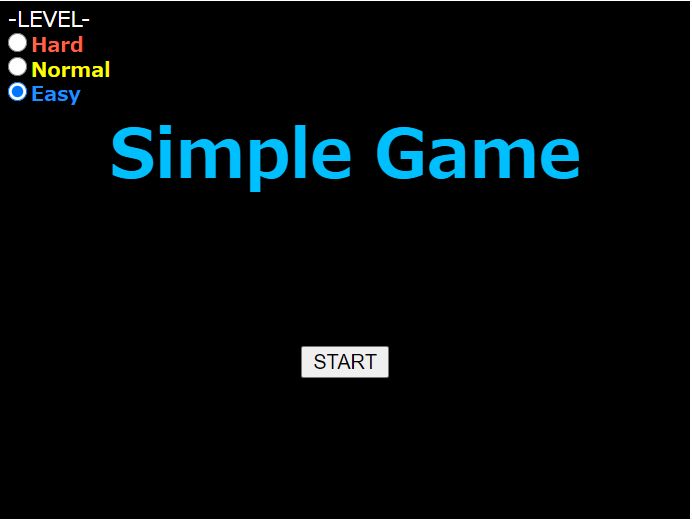
・「START」ボタンを押すと、ゲームが始まります。
・「-LEVEL-」では、自分で難易度を選択することができます。(Hard:難しい、Normal:普通、Easy:易しい)
ゲーム画面
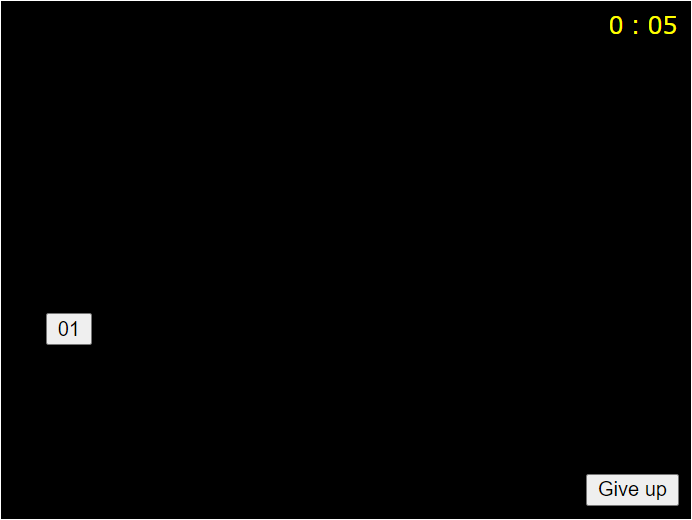
・数字が書かれているボタンをクリックしていきます。画像では「01」となっていますが、クリックすると数字が1増えます。「20」をクリックしたら、ゲーム終了となります(ソースコード「main.js」の変数LOOPで簡単に変更可)。
・「0:05」は、タイムを表しています。
・「Give up」ボタンを押すことで、ゲームを強制終了させることができます。
・ボタンの移動する間隔は、難易度によって異なります。仕様は以下の通りです(「01」→「20」まで、一定の間隔で速くなっていきます)。
- Hard:難しい
- 最初(「01」):0.7秒
- 最後(「20」):0.4秒
- Normal:普通
- 最初(「01」):0.85秒
- 最後(「20」):0.6秒
- Easy:易しい
- 最初(「01」):1秒
- 最後(「20」):0.8秒
終了画面
「20」までクリックできた(ゲームクリア)場合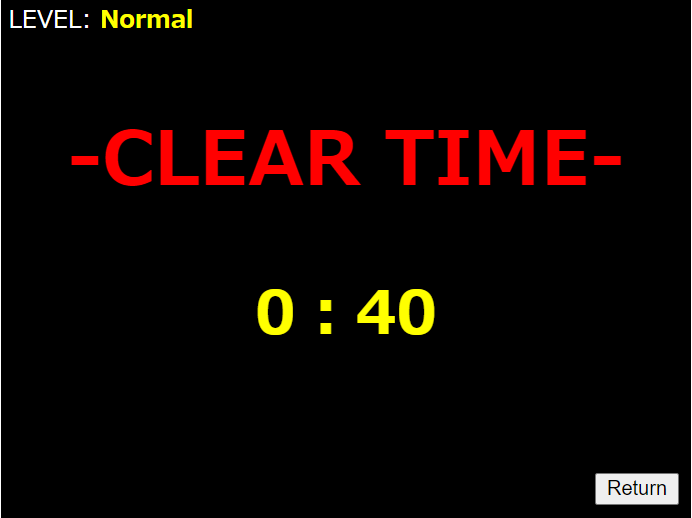
途中で「Give up」ボタンを押した(ゲームオーバー)場合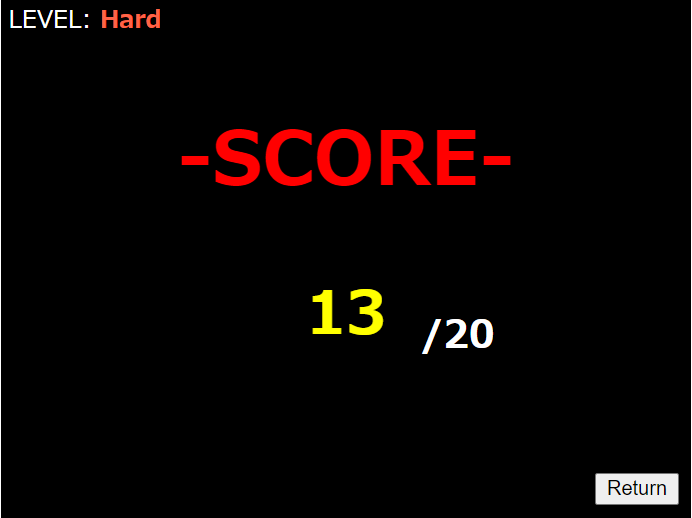
・(前者)「0:40」は、「20」をクリックできた時点でのタイムを表しています。
・(後者)「13 /20」は、自分がクリックできなかったボタンの数字を表しています(画像では「13」)。
・「LEVEL:」は、自分が選択した難易度を表しています。
・「Return」ボタンを押すと、「起動画面」に戻ります(ページリロード)。
ソースコード
JavaScript
constLOOP=20;//数字ボタンの出現回数letpassSec=0;letcount;letnum;letcdiv;letselectLevel;//背景生成functionchgImg(){constpdiv=document.getElementById("parent-div");//canvasの描画constcanvas=document.createElement("canvas");canvas.width=460;canvas.height=345;pdiv.appendChild(canvas);constcontext=canvas.getContext("2d");context.fillStyle="#000000";context.rect(0,0,canvas.width,canvas.height);context.fill();//canvasからimgに変換constjpg=canvas.toDataURL();constnewImg=document.createElement("img");newImg.src=jpg;pdiv.replaceChild(newImg,canvas);}//画面内消去functionClear(){while(cdiv.firstChild){cdiv.removeChild(cdiv.firstChild);}}//起動画面functionStart(){//タイトルconsttitleText=document.createElement("h1");consttitleContent=document.createTextNode("Simple Game");titleText.appendChild(titleContent);titleText.id="title";cdiv.appendChild(titleText);//スタートボタンconststartButton=document.createElement("button");conststartContent=document.createTextNode("START");startButton.appendChild(startContent);startButton.id="start";cdiv.appendChild(startButton);//難易度選択(ラジオボタン)constlevelText=document.createElement("p");constlevelContent=document.createTextNode("-LEVEL-");levelText.appendChild(levelContent);levelText.id="level";cdiv.appendChild(levelText);constlevelDiv=document.createElement("div");levelDiv.id="level-div";cdiv.appendChild(levelDiv);//難易度:難しいconsthardDiv=document.createElement("div");levelDiv.appendChild(hardDiv);consthardRadio=document.createElement("input");consthardAtt={type:"radio",name:"select",value:"hard",id:"hard"}for(letiinhardAtt){hardRadio[i]=hardAtt[i];}hardDiv.appendChild(hardRadio);consthardLabel=document.createElement("label");consthardText=document.createTextNode("Hard");hardLabel.appendChild(hardText);hardLabel.htmlFor="hard";hardDiv.appendChild(hardLabel);//難易度:普通constnormalDiv=document.createElement("div");levelDiv.appendChild(normalDiv);constnormalRadio=document.createElement("input");constnormalAtt={type:"radio",name:"select",value:"normal",id:"normal"}for(letiinnormalAtt){normalRadio[i]=normalAtt[i];}normalDiv.appendChild(normalRadio);constnormalLabel=document.createElement("label");constnormalText=document.createTextNode("Normal");normalLabel.appendChild(normalText);normalLabel.htmlFor="normal";normalDiv.appendChild(normalLabel);//難易度:易しいconsteasyDiv=document.createElement("div");levelDiv.appendChild(easyDiv);consteasyRadio=document.createElement("input");consteasyAtt={type:"radio",name:"select",value:"easy",id:"easy",checked:"checked"}for(letiineasyAtt){easyRadio[i]=easyAtt[i];}easyDiv.appendChild(easyRadio);consteasyLabel=document.createElement("label");consteasyText=document.createTextNode("Easy");easyLabel.appendChild(easyText);easyLabel.htmlFor="easy";easyDiv.appendChild(easyLabel);}//タイマー処理functionshowPassage(){constwatch=document.getElementById("wat-style");passSec++;letsec=passSec%60;//秒letmin=parseInt(passSec/60);//分if(sec<=9){sec="0"+sec;}if(min>=10){constwatLayout=window.getComputedStyle(watch);watch.style.left=watLayout.left;watch.style.left=395+"px";}count=min+":"+sec;watch.innerHTML=count;}//数字ボタンの位置決定functionMove(){letx,y;do{x=Math.random();//imgの左上隅画素の中心を原点(0,0)とした時の、右方向へ正のX座標を決める乱数y=Math.random();//imgの左上隅画素の中心を原点(0,0)とした時の、下方向へ正のY座標を決める乱数}while((x*429>352&&y*324>287)||(x*429>356&&y*324<30));//終了ボタンやタイマーと重なったらやり直しconstnumberBut=document.getElementById("num-but");constnumStyle=window.getComputedStyle(numberBut);numberBut.style.left=numStyle.left;numberBut.style.top=numStyle.top;numberBut.style.left=x*429+"px";numberBut.style.top=y*324+"px";}//終了画面functionEnd(issue){constname=document.createElement("h1");name.id="nametag";constresult=document.createElement("h2");result.id="resulttag";//1:ゲームクリア, 2:ゲームオーバーswitch(issue){case1:constwinContent=document.createTextNode("-CLEAR TIME-");name.appendChild(winContent);cdiv.appendChild(name);consttimeResult=document.createTextNode(count);result.appendChild(timeResult);cdiv.appendChild(result);break;case2:constloseContent=document.createTextNode("-SCORE-");name.appendChild(loseContent);cdiv.appendChild(name);constscoreResult=document.createTextNode(num);result.appendChild(scoreResult);cdiv.appendChild(result);constmax=document.createElement("h3");max.id="maxtag";constmaxContent=document.createTextNode("/"+LOOP);max.appendChild(maxContent);cdiv.appendChild(max);}//リターンボタン(ページリロード)constreturnButton=document.createElement("button");constreturnContent=document.createTextNode("Return");returnButton.appendChild(returnContent);returnButton.id="return";cdiv.appendChild(returnButton);returnButton.onclick=function(){window.location.reload();}//設定難易度の表示constselectText=document.createElement("p");constmyLevel=selectLevel.charAt(0).toUpperCase()+selectLevel.slice(1);selectText.innerHTML="LEVEL: <span id=\"select-"+selectLevel+"\">"+myLevel+"</span>"selectText.id="select-text";cdiv.appendChild(selectText);}window.onload=function(){cdiv=document.getElementById("child-div");chgImg();Start();document.getElementById("start").addEventListener("click",function(){letfirst,next;constselect=document.getElementsByName("select");//ラジオボタンで難易度設定for(leti=0;i<select.length;i++){if(select[i].checked){selectLevel=select[i].value;break;}}//hard:難しい, normal:普通, easy:易しいswitch(selectLevel){case"hard":first=700;next=300/(LOOP-1);break;case"normal":first=850;next=250/(LOOP-1);break;case"easy":first=1000;next=200/(LOOP-1);}Clear();//タイマー生成constwatch=document.createElement("p");watch.id="wat-style";cdiv.appendChild(watch);watch.innerHTML="0:00";passSecID=setInterval("showPassage()",1000);//数字ボタンの処理constnumButton=document.createElement("input");numButton.type="button";numButton.value="01";num=1;numButton.id="num-but";cdiv.appendChild(numButton);Move();timer=setInterval("Move()",first);numButton.onclick=function(){clearInterval(timer);if(num<9){numButton.value="0"+++num;}else{numButton.value=++num;}Move();timer=setInterval("Move()",first-next*(num-1));if(numButton.value>LOOP){clearInterval(timer);clearInterval(passSecID);Clear();End(1);}}//終了ボタンconstendButton=document.createElement("button");constendContent=document.createTextNode("Give up");endButton.appendChild(endContent);endButton.id="give-up";cdiv.appendChild(endButton);endButton.onclick=function(){clearInterval(timer);clearInterval(passSecID);Clear();End(2);}});}HTML
<!DOCTYPE html><html><head><metacharset="utf-8"><linkrel="stylesheet"href="style.css"></head><body><divid="parent-div"><divid="child-div"></div></div><script src="main.js"></script></body></html>CSS
img{user-select:none;-webkit-user-drag:none;-khtml-user-drag:none;-moz-user-drag:none;-o-user-drag:none;}#parent-div{position:relative;width:460px;height:345px;}#title{color:#00bfff;font-family:sans-serif;font-size:45px;text-align:center;position:absolute;top:70px;left:0;right:0;margin:auto;user-select:none;}#start{position:absolute;top:230px;left:0;right:0;margin:auto;}#give-up{position:absolute;top:315px;left:390px;}#num-but{position:absolute;left:0;top:0;}#wat-style{position:absolute;left:405px;top:5px;color:yellow;margin:0;user-select:none;}#nametag{color:red;font-family:sans-serif;font-size:50px;text-align:center;position:absolute;top:70px;left:0;right:0;margin:auto;user-select:none;}#resulttag{color:yellow;font-family:sans-serif;font-size:40px;text-align:center;position:absolute;top:180px;left:0;right:0;margin:auto;user-select:none;}#maxtag{color:white;font-family:sans-serif;font-size:25px;position:absolute;top:180px;left:280px;user-select:none;}#return{position:absolute;top:315px;left:396px;}#level{font-family:sans-serif;position:absolute;top:2px;left:5px;color:white;margin:0;user-select:none;font-size:90%;}label[for="hard"]{font-family:sans-serif;color:#ff6347;font-size:85%;font-weight:bold;user-select:none;padding:0;}label[for="normal"]{font-family:sans-serif;color:yellow;font-size:85%;font-weight:bold;user-select:none;}label[for="easy"]{font-family:sans-serif;color:#1e90ff;font-size:85%;font-weight:bold;user-select:none;}#level-div{position:absolute;top:18px;left:0;line-height:10px;}#select-hard{color:#ff6347;font-weight:bold;}#select-normal{color:yellow;font-weight:bold;}#select-easy{color:#1e90ff;font-weight:bold;}#select-text{position:absolute;top:2px;left:5px;color:white;margin:0;user-select:none;}varとletとconstの使い分けについて
再宣言も再代入もできるのがvar、再宣言はできないが再代入ができるのがlet、再宣言も再代入もできないのがconstですが、再宣言も再代入もできるvarが一番便利だから、「変数は基本varでいいんじゃないの?」と思って、このゲームをプログラミングした当初は基本varを使っていました。
しかし、変数が意図せず上書きされてしまったり、思わぬバグが発生したりするケースがあるようです。
なので変数は基本constで宣言し、for文等で使用する再代入が必要な変数はletで宣言するようにしてみました。
上記のJavaScriptのソースコードから分かるように、varは一度も使用していません。
これからも何かJavaScriptでプログラミングする際には、そのように意識してみたいと思います。
感想
今回、なるべくHTMLはコーディングせず、基本JavaScriptによるDOM操作でプログラミングしてみました。結果として、DOM操作に慣れることができたので良かったと思いました。ただ、非常にシンプルなゲームであっても、イメージを形にすることに時間がかかり、改めて難しいと感じました。まだまだJavaScriptの知識は足りないので、これからも学習を続けていきたいと思います。
参考サイト
JavaScript - ページを再読み込みする
文字列を整数に変換!JavaScriptのparseInt( )の使い方【初心者向け】
canvasを画像に変換する
JavaScriptで書く「var,let,const」の違いと使い分け方法
window.getComputedStyle() で要素のスタイルを取得する